
A practice conversation that is scored, with the score in your gradebook.
The learner talks with an AI character in a scenario from your course. The conversation is scored against your rubric, or the standard your experts set, with feedback on what the learner actually said.
- Scored against
- Your rubric, or one you approve
- Feedback
- On every criterion
- Who grades
- Your choice, per activity
- Score goes to
- The gradebook in your LMS
The learner reads the rubric first, and gets it back graded.
The conversation itself is described under practice conversations and simulations. This is what happens to it afterward.
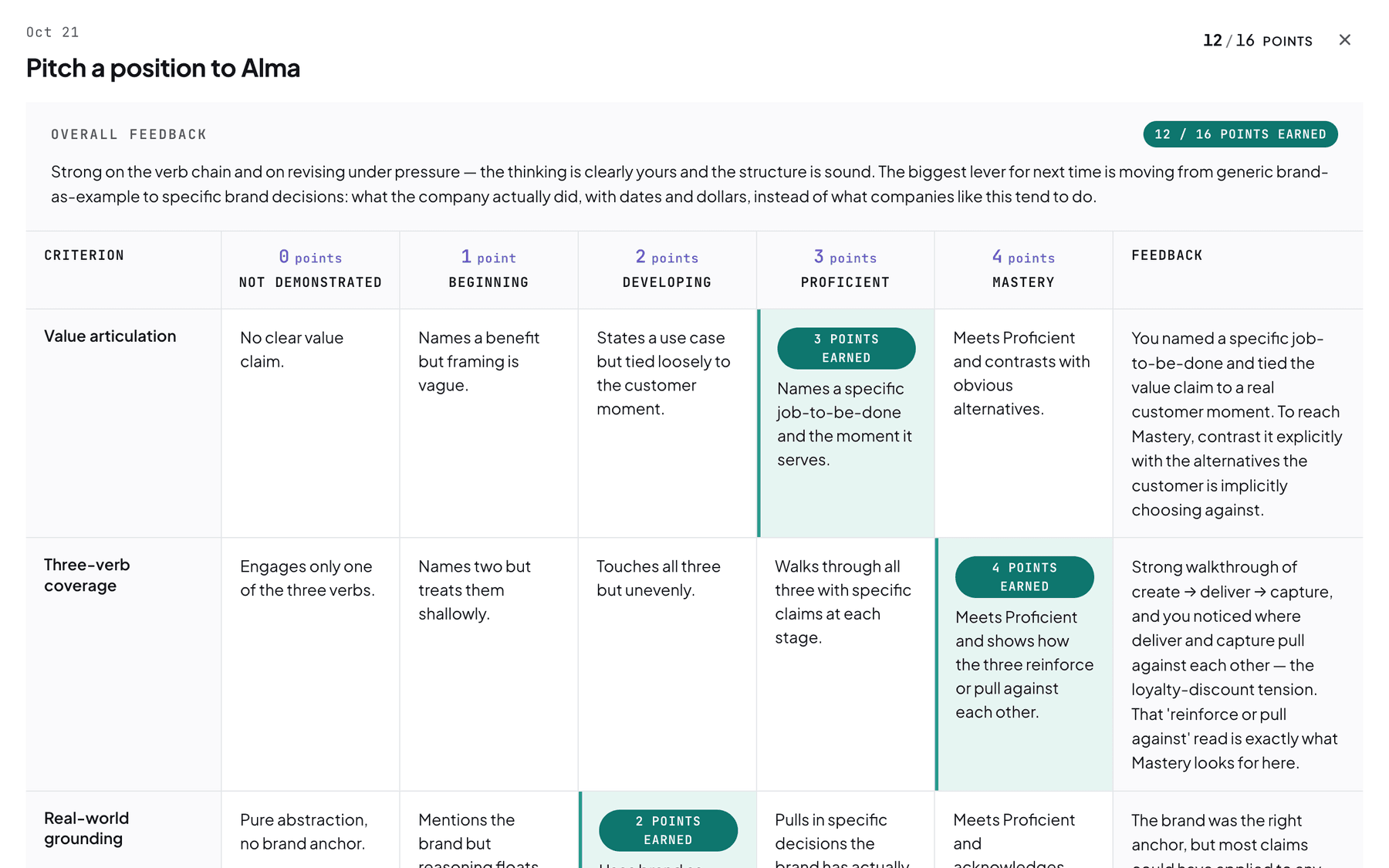
The rubric comes first
A link to the rubric sits under the session, so the learner can read what will be scored before the conversation starts. Nothing is revealed only in the grade.
Feedback on every criterion
Each criterion shows the level reached, what that level means, and a comment on what the learner actually said. An overall note names the strongest move and the main thing to improve.
What was missing
The comments name the techniques the learner used and the ones that never came up, so the next attempt has somewhere to go.
You choose which conversations count and how each is graded.
Practice or scored, conversation by conversation
Each conversation with an AI character is set up as practice or as scored work, and the choice is yours.
Your rubric, and your choice of grading
Scoring follows your rubric, or one we draft and you approve. For a company, that is the standard your experts set. Each scored conversation is AI-graded and human-confirmed, fully by people, or fully by AI.
What the instructor sees
The rubric, with the level reached on each criterion and the comment under it. The score goes to the gradebook in your LMS.
What a score does and does not say
A score reports what the learner said in one attempt, measured against the criteria you approved. How much it counts toward the final grade is your decision.
A score can set a baseline, or show readiness.
It can show where the learner starts, test their judgment on a case, or confirm they are ready. Three examples, with the scored conversation in a different place each time.
To set a baseline
- Scored simulation
- Interactive lecture
- Practice conversation
- Reflection
A scored first attempt shows where the learner starts against the rubric. The lecture teaches what was missing, practice builds it, and the learner reflects on the difference.
To test judgment on a case
- Case study
- Scored simulation
- AI coaching
- Reflection
The case sets up the situation and the scored conversation tests how the learner handles it. Coaching then goes back over the feedback, criterion by criterion.
To show readiness
- Interactive lecture
- Practice conversation
- Scored simulation
- Discussion
The lecture teaches the technique and practice lets the learner try it with nothing at stake. The scored simulation then shows they are ready, and the discussion compares approaches.
Other work that gets graded.
Practice conversations & simulations
The practice itself: what the conversation is like and how a scenario is built.
See practice conversationsGrading options
Who grades each piece of work, against which rubric, and where the score goes.
See grading optionsAssignments, projects & capstones
When the learner should produce written work, get comments, and revise it.
See assignmentsBook a demo and bring a conversation your people need to get right.
We will show a scored conversation and the rubric that comes back, then talk through the one you have in mind.